
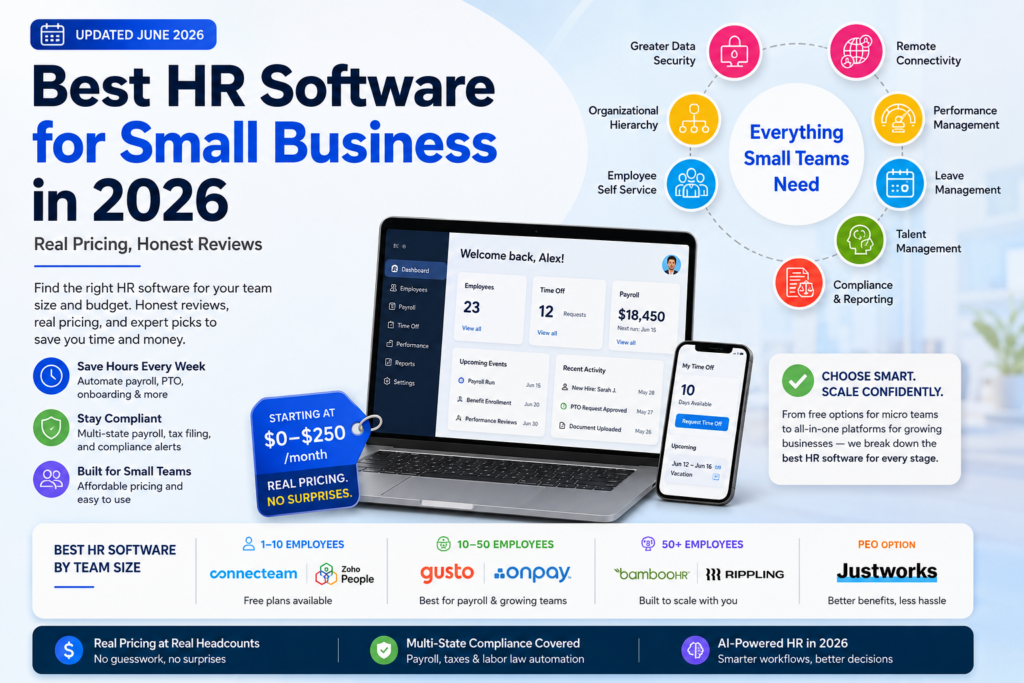
If you’re Googling this, you’re probably the de facto HR department at your company — alongside three other jobs. The best HR software for small business doesn’t just digitize paperwork; it gives back hours every week that you’re currently spending on PTO requests, payroll corrections, and onboarding checklists. HR automation has matured significantly in the past two years, and the gap between spreadsheet chaos and fully automated is now a $0–250/month decision rather than an enterprise-only investment. This guide breaks down exactly what each tool costs at real headcounts, what you actually get for free, and which platform fits your team size — without the vague pricing and one-sided reviews you’ll find elsewhere.
Why Small Businesses Actually Need HR Software
Spreadsheets work fine until they don’t. Here’s where they typically break down — and what HR software actually replaces once you adopt it.
- Manual payroll errors compound. A miscalculated tax withholding or a missed overtime threshold can trigger penalties and damage trust. HR automation removes the manual calculation step entirely.
- Scattered employee records create real risk. When PTO balances and tax documents live across email and personal drives, you’re one departed employee away from losing institutional knowledge.
- Onboarding without a system wastes the first week. Structured digital onboarding consistently improves new-hire retention in the critical first 90 days.
- Performance conversations get skipped without structure. Performance management features create a paper trail that protects both employee and business during disputes.
The honest threshold: if you’re spending more than 3–4 hours a week on HR admin, a $100–250/month tool almost always costs less than the time it recovers.
Quick Picks: Cost at 10 Employees
| Tool | Cost at 10 Employees | Free Tier | Best For |
| Gusto | ~$109/mo (Simple) | No | Payroll-first small teams |
| OnPay | ~$109/mo (multi-state incl.) | No | Budget-conscious teams |
| BambooHR | ~$250/mo (flat floor) | No | HR-first, hiring-focused |
| Rippling | ~$115/mo (Core HR) | No | Tech-forward HR + IT |
| Connecteam | $0 | Yes (10 users) | Hourly/shift micro teams |
| Zoho People | $0 | Yes (5 employees) | Solo founders, tiny teams |
Payroll-First or HR-First? Answer This Before You Buy
This is the question every competitor skips, and it’s the fastest way to narrow your options.
- Choose payroll-first (Gusto, OnPay) if running payroll without tax errors is your main pain point and you don’t yet need deep applicant tracking.
- Choose HR-first (BambooHR) if payroll is already handled elsewhere and you need stronger employee records, onboarding, and performance management.
- Choose all-in-one (Rippling) if you want HR, payroll, and IT device provisioning on a single data model — useful once you’re issuing laptops alongside offer letters.
| 💡 Quick check If your current process is manual payroll plus a spreadsheet, start payroll-first. If payroll is handled and your real pain is disorganized records, start HR-first. |
How to Choose: 5 Questions Before You Sign Up
- What’s the real cost at your headcount? Per-employee pricing compounds fast — calculate cost at your actual team size, not the marketing page’s lowest tier.
- Are there hidden fees beyond the subscription? Setup fees, data migration charges, and per-module add-ons are common — ask before signing.
- Does it handle multi-state payroll? Confirm this is included, not a paid add-on, if you have remote employees in different states.
- Can your team use it without training? If a PTO request takes more than two clicks, adoption will suffer.
- What happens to your data if you switch later? Confirm full export of employee history — vendor lock-in is a real, hidden cost.
Best HR Software for Small Business: Reviews by Team Size
Micro Teams (1–10 Employees)
Gusto — Best for Payroll-First Small Teams
Cost at 10 employees: ~$109/month (Simple plan) | Free tier: No
✅ Pro: Pricing is public and predictable — no sales call required to find out what you’ll pay.
⚠️ Con: International contractor support is limited to about 10 countries through a Remote partnership.
🏆 Verdict: Best starting point for a US-based team under 15 people that wants reliable payroll without complexity.
| 💡 Tip Gusto raised its Simple plan base fee from $40 to $49 in March 2026 — confirm current pricing before budgeting. |
OnPay — Best Budget Pick for Multi-State Teams
Cost at 10 employees: ~$109/month (multi-state included) | Free tier: No
✅ Pro: No surprise per-state fees. What you see is what you pay.
⚠️ Con: Lighter on performance management and engagement features than BambooHR or Rippling.
🏆 Verdict: The most underrated option for budget-conscious teams with employees in more than one state.
Connecteam — Best Genuinely Free Option for Hourly Teams
Cost at 10 employees: $0 | Free tier: Yes — up to 10 users
✅ Pro: Genuinely usable free plan, not a stripped-down trial.
⚠️ Con: Payroll isn’t included — pair it with a dedicated payroll tool as you grow.
🏆 Verdict: Best zero-budget starting point if your team is hourly and under 10 people.
Zoho People — Best Free Option for Solo Founders
Cost at 5 employees: $0 | Free tier: Yes — up to 5 employees
✅ Pro: Genuinely free, not a 14-day trial dressed up as a free plan.
⚠️ Con: Caps out fast — once you cross 5 employees, you’re moving to a paid tier.
🏆 Verdict: Solid starting point for solo founders making their first 1–5 hires.
Growing Teams (10–50 Employees)
BambooHR — Best HR-First Platform for Hiring-Focused Teams
Cost at 10 employees: ~$250/month (flat floor) | Free tier: No (free trial available)
✅ Pro: Best-in-class onboarding and hiring tools for teams without a dedicated recruiter.
⚠️ Con: Pricing isn’t published publicly, and the flat $250/month floor means you’re paying for features you may not use yet under 25 employees.
🏆 Verdict: Right choice once hiring volume and performance management matter more than saving $100/month.
| 💡 Tip Request a demo focused on the applicant tracking workflow before comparing pricing — the ATS is the strongest reason to choose this over Gusto. |
Rippling — Best All-in-One for Tech-Forward Teams
Cost at 10 employees: ~$115/month (Core HR + platform fee) | Free tier: No
✅ Pro: The only platform here that genuinely unifies HR and IT — payroll, benefits, and laptop provisioning in one workflow.
⚠️ Con: Modular pricing means your bill depends on how many modules you add — a 100-employee company can pay $15–25/employee/month once fully built out.
🏆 Verdict: Best for tech-forward teams scaling fast that want HR and device management connected from day one.
Justworks — Best PEO for Benefits at Small Business Prices
Cost at 10 employees: ~$599/month base (PEO model) | Free tier: No
✅ Pro: Access to large-group health insurance rates a 10-person company couldn’t negotiate alone.
⚠️ Con: The PEO model means less flexibility — you’re tied to Justworks’ benefits providers and structure.
🏆 Verdict: Worth evaluating specifically if competitive health benefits matter more than software flexibility.
Factorial — Best Budget Pick for Global Recruitment
Cost at 10 employees: ~$80/month (entry tier) | Free tier: No (free trial available)
✅ Pro: Strong recruitment and applicant tracking at a lower price point than BambooHR.
⚠️ Con: Customization is more limited than Rippling or BambooHR for non-standard HR workflows.
🏆 Verdict: Worth a look if international recruitment matters more than deep US payroll compliance.
Scaling Teams (50+ Employees)
At this size, the conversation shifts from “what’s cheapest” to “what scales without breaking.” BambooHR becomes genuinely worth its price once you’ve outgrown spreadsheet-style hiring tracking. Rippling becomes more cost-competitive too, since per-module pricing flattens out relative to flat-rate competitors.
| Team Size | Recommended Approach |
| 50–75 employees | BambooHR or Rippling as primary system, with a dedicated performance tool layered in if needed |
| 75–150 employees | Rippling’s modular pricing usually wins on cost; consider a PEO if benefits competitiveness is a hiring blocker |
| 150+ employees | Dedicated HRIS platforms like Workday or UKG enter the conversation — typically $34–100/employee/month |
AI-Native HR Features in 2026
This is the section every competitor in this category skips — and it’s becoming relevant fast.
Conversational reporting: Some platforms let HR teams ask plain-language questions and get an instant answer instead of manually pulling a report.
AI-generated job descriptions: Several tools generate job descriptions and interview questions based on role and required skills.
Automated compliance alerts: AI-driven compliance tracking flags state-by-state legal changes affecting your specific workforce.
| 💡 Try this now When evaluating any HR platform in 2026, ask specifically whether AI features are included in your tier or sold as a separate add-on. |
Full Comparison Table: Cost at Real Headcounts
| Tool | 10 Employees | 25 Employees | Free Tier | Watch Out For |
| Gusto | ~$109/mo | ~$260/mo | No | Base fee increases periodically |
| OnPay | ~$109/mo | ~$199/mo | No | Lighter HR feature depth |
| BambooHR | ~$250/mo | Custom quote | No | Payroll is a separate add-on |
| Rippling | ~$115/mo | Custom (modular) | No | Per-module pricing compounds |
| Connecteam | $0 | ~$70/mo+ | Yes (10 users) | No payroll included |
| Zoho People | $0 | Paid tier required | Yes (5 employees) | Caps out fast |
| ADP RUN | Custom quote | Custom quote | No | Flat plans can cost more at small scale |
Multi-State Compliance: What Small Businesses Get Wrong
If you have even one remote employee in a different state, compliance gets more complicated than most founders expect — and this is an area where the right software earns its cost back quickly.
- State-specific tax withholding must be calculated for every state you have employees in. Manual payroll frequently gets this wrong.
- Overtime rules vary by state beyond the federal baseline — California requires daily overtime calculations that differ from the federal weekly standard.
- Paid leave mandates differ significantly by state, with specific accrual rates regardless of company policy.
- New hire reporting is required within 20 days of hire in most states — payroll-first tools automate this; manual processes often miss it.
| 💡 Explore further If you have remote employees in three or more states, multi-state compliance automation alone often justifies the cost difference between a budget tool and a more complete platform. |
Hidden Costs to Watch For
- Setup and implementation fees — some platforms charge a one-time onboarding fee not listed on the pricing page
- Per-module add-ons — payroll, benefits, and time tracking are frequently sold separately from the core platform
- Data migration charges — moving employee history from a previous vendor sometimes carries a fee
- Contract minimums — some vendors require annual commitments even when monthly billing is advertised
- Per-state payroll fees — confirm whether multi-state payroll is included or charged per state
| 💡 Your next step Before signing with any vendor, ask directly: ‘What is my total monthly cost including setup, all required modules, and any per-state fees?’ Get the answer in writing. |
Budget Stacks: What to Actually Buy
Bootstrapped Founder Stack — $0/month
- Zoho People (free) — employee records for up to 5 people
- Connecteam (free) — scheduling and time tracking if hourly
- A spreadsheet or Stripe for simple contractor payments
Works until you hit 5–10 employees or need real payroll automation.
Lean Small Team Stack — ~$110–150/month
- Gusto Simple or OnPay — payroll, tax filing, and basic HR for a 10-person team
- Built-in PTO tracking and direct deposit included
Covers nearly everything a small team under 15 people needs without add-on sprawl.
Full-Service Stack — ~$400–600/month
- BambooHR for hiring, onboarding, and performance management
- Gusto or OnPay for payroll if BambooHR’s add-on pricing doesn’t fit your budget
- A dedicated benefits broker or PEO for health coverage at scale
Covers most needs for a 25–50 person team without forcing a single vendor to do everything imperfectly.
FAQ: HR Software for Small Business
What is the cheapest HR software for small business?
Connecteam and Zoho People offer genuinely free tiers — Connecteam for up to 10 hourly employees and Zoho People for up to 5 employees — but neither includes full payroll. For the cheapest paid option with payroll, OnPay and Gusto both run roughly $109/month for a 10-person team.
Is there truly free HR software for small business?
Yes, with real limits. Connecteam is free for up to 10 users and covers scheduling and time tracking. Zoho People is free for up to 5 employees and covers basic records and reporting. Neither includes payroll processing.
Gusto vs. BambooHR vs. Rippling — which should I choose?
Choose Gusto if payroll accuracy and transparent pricing matter most and you’re under 15 employees. Choose BambooHR if hiring volume and employee experience matter more than saving money. Choose Rippling if you want HR and IT device management unified from day one.
What HR tools do startups need first?
Most startups need payroll and basic employee records first. Start with Gusto, OnPay, or Zoho People’s free tier. Add applicant tracking and structured onboarding once you’re hiring regularly. HR tools for startups specifically should prioritize speed of setup over feature depth — a tool that takes two weeks to configure will sit unused while you’re focused on product and customers.
What’s the difference between human resource software and a PEO?
Human resource software like Gusto or BambooHR is a tool you operate yourself — you remain the legal employer. A PEO like Justworks co-employs your staff, giving access to enterprise-level benefits rates in exchange for less flexibility. Most businesses under 20 employees are better served by standalone software.
Does HR software help with compliance?
Yes. Most platforms automatically update tax tables, overtime thresholds, and minimum wage requirements as laws change, and generate compliant W-2 and 1099 forms automatically. Manual spreadsheet-based HR carries real compliance risk.
How long does it take to set up HR software?
Gusto and OnPay typically take a few days to a week. BambooHR and Rippling usually take three to eight weeks, particularly if migrating historical employee data.
Can I switch HR software providers later without losing data?
In most cases, yes — every reputable platform allows CSV or full export of employee records. The bigger risk is the time cost of re-validating records in a new system, plus any contract minimums.
Conclusion
The best HR software for small business isn’t the platform with the most features — it’s the one that fits your team size, your budget, and the specific pain point costing you the most time right now. Start with a genuinely free tool if your team is under 10 people. Move to Gusto or OnPay once payroll becomes a real headache. Upgrade to BambooHR or Rippling once hiring volume or IT provisioning makes a single connected system worth the cost.
Every vendor in this category will tell you their pricing is simple. It rarely is — confirm the real cost at your actual headcount, including every add-on, before you sign anything.