Best Accounting Software for Freelancers in 2026 Real Pricing, Real Tax Help — Updated June 2026 Quarterly taxes don't care that you're three projects deep and behind on invoicing. The best accounting software for freelancers does more than track invoices — it tells you what to set aside for the IRS before the deadline sneaks up on you, something most comparison articles never actually explain. This guide breaks down what each tool costs at real freelance income levels, which ones genuinely help with quarterly estimated taxes, and which platform fits your stage — whether you're testing a side hustle or running an incorporated freelance business. Quick Picks Best Accounting Software for Freelancers Tool Best For Free Tier Starting Price Wave Budget-zero freelancers Yes — full accounting Free (transaction fees apply) FreshBooks Service-based freelancers No (30-day trial) $11month QuickBooks Solopreneur Tax-focused freelancers No $20month Bonsai Contracts + accounting combo No (trial) $25month Zoho Books International freelancers Yes (under $50k revenue) Free $20month ZipBooks Getting paid faster Yes (limited) $15month Side-Gig, Full-Time, or Incorporated Pick Your Stage First No other guide segments this way, and it's the fastest way to narrow your choice. Your tool needs change dramatically as your freelance income grows. • Side-gig freelancer (under $20kyear) You need free or near-free expense tracking, simple invoicing, and basic profit tracking. Wave or Zoho Books' free tier covers this completely. • Full-time freelancer ($20k–$100kyear) Quarterly estimated taxes become a real obligation. You need a tool that calculates and reminds you of payments. QuickBooks Solopreneur or FreshBooks fit here. • Incorporated freelancer ($100k+year) You likely have a bookkeeper involved and need software your CPA can access directly. Full QuickBooks Online or Xero becomes worth the cost. 💡 Quick check Look at your last tax bill. Under $3,000 owed → side-gig tools work fine. $3,000–$15,000 → you need quarterly tax support. Above that → talk to an accountant about incorporating. How to Choose 5 Questions Before You Sign Up • Does it actually help with quarterly estimated taxes Far fewer tools calculate what you owe quarterly or remind you before the deadline than you'd expect. • What's the real cost including payment processing fees A 'free' tool charging 2.9% per payment isn't free once you're collecting $80kyear through it. • Can your accountant access it directly Confirm accountant-level access without sharing your full login if you plan to hire help later. • Does it handle multi-currency Confirm native support if you invoice international clients, rather than manual conversion math. • Can you export everything if you switch later Confirm full CSV or accounting-standard export before committing. Best Accounting Software for Freelancers Tool Reviews Wave — Best Free Option for Budget-Zero Freelancers Best for Side-gig and early-stage freelancers Genuinely free Yes — full double-entry accounting at no monthly cost Cost ~$0year + transaction fees (2.9% + $0.60card, 1% ACH) Wave is the most complete free accounting tool available to freelancers, not a stripped-down trial dressed up as free. The dashboard shows cash flow, bank balances, and a profit and loss graph without ever asking for a credit card. ✅ Pro Genuinely free core accounting, not a 14-day trial. The friendliest learning curve on this list. ⚠️ Con No built-in quarterly tax calculator — you'll need to estimate manually or pair it with a separate tax tool. 🏆 Verdict Best starting point for any freelancer earning under $30kyear who wants real financial planning tools without spending a cent. 💡 Tip If you're testing whether freelancing is sustainable before going full-time, start with Wave's free tier and revisit once you cross consistent $2,000+ months. QuickBooks Solopreneur — Best for Quarterly Tax Tracking Best for Full-time freelancers who want tax season handled automatically Genuinely free No Cost ~$240year ($20month) Built specifically around the tax problem other tools ignore. Onboarding asks for your industry to surface relevant write-offs, and receipts get scanned via OCR so expenses categorize themselves automatically. ✅ Pro The only tool here that calculates and tracks quarterly estimated taxes as a core, built-in feature. ⚠️ Con Limited compared to full QuickBooks Online — no payroll, no inventory, doesn't scale well once incorporated. 🏆 Verdict Best choice for full-time freelancers whose biggest pain point is staying ahead of the IRS. FreshBooks — Best for Service-Based Freelancers and Consultants Best for Consultants, designers, anyone billing by project or hour Genuinely free No (30-day free trial) Cost ~$132–$300year depending on tier and client count Built its reputation on invoicing and time tracking. Track time directly against a project, pin hours to a client, and convert tracked time into an invoice in two clicks. ✅ Pro The cleanest, most intuitive invoicing experience available — clients consistently comment on how professional invoices look. ⚠️ Con Pricing scales by client count, not just features, so consultants with 15+ active clients hit higher tiers fast. 🏆 Verdict Best for service-based freelancers whose core workflow is tracking billable time and sending polished invoices. 💡 Tip FreshBooks now offers a Payroll add-on if you start subcontracting work — useful the moment your freelance business starts hiring help. Bonsai — Best All-in-One for Contracts Plus Accounting Best for Freelancers who want contracts, proposals, and bookkeeping in one subscription Genuinely free No (free trial available) Cost $25month (Pro plan) Goes beyond pure accounting by bundling contract templates, proposal generation, and automated client onboarding alongside bookkeeping tools. ✅ Pro The only tool here that handles legal contracts and accounting in a single subscription. ⚠️ Con Accounting depth is lighter than FreshBooks or QuickBooks — prioritizes breadth over deep financial reporting. 🏆 Verdict Best for new freelancers who want one tool covering contracts, proposals, and basic bookkeeping. Zoho Books — Best for International and Multi-Currency Freelancers Best for Freelancers with clients outside their home country Genuinely free Yes — under $50,000 in annual revenue Cost $20month above the free threshold Handles multi-currency invoicing natively, a feature several competitors treat as an afterthought. If you invoice in euros, pounds, or any foreign currency, Zoho converts and tracks this without manual math. ✅ Pro Best native multi-currency support of any tool here, plus a real free tier for early-stage international freelancers. ⚠️ Con Steeper initial learning curve than Wave or FreshBooks, and US-specific tax features are less developed. 🏆 Verdict Best choice for freelancers working primarily with international clients who need real multi-currency accounting. ZipBooks — Best for Getting Paid Faster Best for Freelancers whose biggest pain point is late-paying clients Genuinely free Yes, with limited features Cost $15month (Smarter plan) Standout feature is its Invoice Score — a real-time rating of how complete and payment-friendly your invoice is, based on factors like payment options, clear terms, and a polished note. ✅ Pro The Invoice Score feature is unique among every tool here and directly addresses getting paid on time. ⚠️ Con Reporting and tax features are lighter than QuickBooks or FreshBooks — better as a secondary tool. 🏆 Verdict Worth considering if late payments are your biggest operational headache, paired with a more robust tax tool. Quarterly Estimated Taxes The Section Every Other Guide Skips If you're self-employed and expect to owe more than $1,000 in taxes for the year, the IRS requires quarterly estimated payments — and missing them triggers penalties even if you pay in full come April. • Wave No built-in quarterly tax calculator. Manually estimate roughly 25–30% of net income or use the IRS Form 1040-ES worksheet. • QuickBooks Solopreneur Calculates estimated quarterly tax liability automatically and sends reminders ahead of each IRS deadline. • FreshBooks Generates profit and loss reports you can hand to an accountant, but doesn't calculate quarterly payments natively. • Bonsai No native quarterly tax calculator, though the financial dashboard simplifies manual estimation. • Zoho Books No automated US quarterly tax calculation — better suited to international tax complexity. 💡 Try this now Set a recurring calendar reminder two weeks before each IRS quarterly deadline (April 15, June 15, September 15, January 15) regardless of whether your software reminds you. AI-Native Bookkeeping Features in 2026 This is genuinely new territory, and not one of the major freelancer accounting comparisons currently covers it. AI expense categorization Several tools now learn your specific spending patterns rather than relying on generic category rules. AI-generated profit and loss summaries Ask a plain-language question like 'how did I do this quarter' and get a written summary instead of a spreadsheet. AI tax-deduction finders AI-driven analysis can flag deductions you may have missed based on patterns in your specific spending. 💡 Get started When evaluating any tool in 2026, ask directly whether AI features are included in your current tier or gated behind a higher-priced plan. Full Comparison Table Real Cost and Tax Support Tool Free Tier Cost at $50k Revenue Quarterly Tax CPA Access Wave Yes (full) ~$0 + fees No (manual) Limited QuickBooks Solopreneur No ~$240yr Yes (auto) Yes FreshBooks No (trial) ~$132–$300yr No (reports) Yes Bonsai No (trial) ~$300yr No (manual) Limited Zoho Books Yes ($50k) $0–$240yr No (intl) Yes ZipBooks Yes (limited) ~$180yr No Limited International Freelancers What to Look For If you work with clients across borders, your accounting needs differ from a domestic freelancer in ways most US-centric guides ignore entirely. • Multi-currency invoicing should convert and track foreign currency payments automatically. Zoho Books leads here among the tools in this guide. • Cross-border payment fees vary by platform — confirm the total fee stack including foreign transaction fees before committing. • Tax treaty awareness matters for clients in countries with tax treaties — consult a tax advisor familiar with international freelance income. • Language and localization matters if any workflow needs to happen outside English — Zoho Books' broader localization is a genuine differentiator. Common Deductions These Tools Help You Track Beyond categorizing expenses, the real value of good expense tracking is catching deductions freelancers commonly miss. • Home office deduction Tools with receipt scanning (FreshBooks, QuickBooks Solopreneur) make it easier to isolate this percentage consistently. • Software and subscriptions Generally deductible — AI-categorization increasingly catches these automatically. • Mileage and travel QuickBooks Solopreneur includes built-in mileage tracking via its mobile app. • Health insurance premiums Typically requires coordination with a tax preparer rather than automatic detection. • Retirement contributions SEP-IRA and Solo 401(k) contributions reduce taxable income — worth a conversation with a financial advisor. 💡 Explore further None of the tools in this guide replace a tax professional for complex deductions. Use the software for day-to-day tracking, and bring a clean year-end report to a CPA. Recordkeeping What the IRS Actually Requires • Keep every receipt for business expenses over $75, ideally everything — OCR scanning removes the friction of doing this consistently. • Separate business and personal accounts if you haven't already — mixing the two is the biggest reason freelancer books become unmanageable. • Retain records for at least three years, though many accountants recommend seven given IRS audit windows. • Track payment method alongside every transaction — important for reconciling against bank statements. FAQ Accounting Software for Freelancers What is the cheapest accounting software for freelancers Wave is the cheapest genuinely complete option — full double-entry accounting at no monthly cost, with fees only applied to actual payment transactions. Zoho Books is free for freelancers under $50,000 in annual revenue. Does Wave actually handle quarterly taxes No — Wave tracks income and expenses cleanly but doesn't calculate or remind you of quarterly estimated tax payments. You'll need to manually estimate using the IRS Form 1040-ES worksheet. QuickBooks Solopreneur vs. FreshBooks — which should I choose Choose QuickBooks Solopreneur if staying ahead of quarterly estimated taxes is your priority. Choose FreshBooks if your core workflow involves tracking billable hours and sending polished invoices. Is there genuinely free accounting software for self-employed people Yes. Wave offers complete double-entry accounting at no cost. Zoho Books is free for freelancers under $50,000 in annual revenue. Both are real, supported products — not time-limited trials. What accounting tools do freelancers need first Start with whichever free tool matches your situation Wave for domestic freelancers, Zoho Books if you have international clients. Add quarterly tax tracking once your income crosses roughly $20,000–$30,000 a year. Accounting tools for freelancers should scale with you, not force a full migration at every income jump. How do I switch accounting software without losing my financial history Confirm CSV or accounting-standard export support before committing. The real cost of switching isn't lost data — it's the time spent re-categorizing transactions, so plan a clean cutover at the start of a new tax year. Does freelance accounting software help with financial planning beyond taxes Yes, to varying degrees. Tools like Wave and QuickBooks Solopreneur show cash flow trends and profit and loss over time, which supports basic financial planning decisions like whether you can afford a slow month or when to raise your rates. Final Thoughts The best accounting software for freelancers isn't the tool with the most features — it's the one that matches your actual revenue stage and actually helps with the tax obligation that causes the most stress every quarter. Start free with Wave or Zoho Books if you're early-stage. Move to QuickBooks Solopreneur the moment quarterly estimated taxes become a real number on your calendar. Every freelance accounting software comparison will tell you pricing is simple. It rarely accounts for payment processing fees at your actual revenue, or whether the tool helps you avoid an IRS penalty come January. Confirm both before you commit. 💡 Your next step Calculate your actual quarterly tax obligation using last year's net income times roughly 25–30%, then check whether your chosen tool tracks that number automatically. Last updated June 2026. Pricing reflects current published rates and may change — verify directly with each vendor before purchasing. This article is for informational purposes only and does not constitute tax or financial advice; consult a qualified tax professional for guidance specific to your situation.

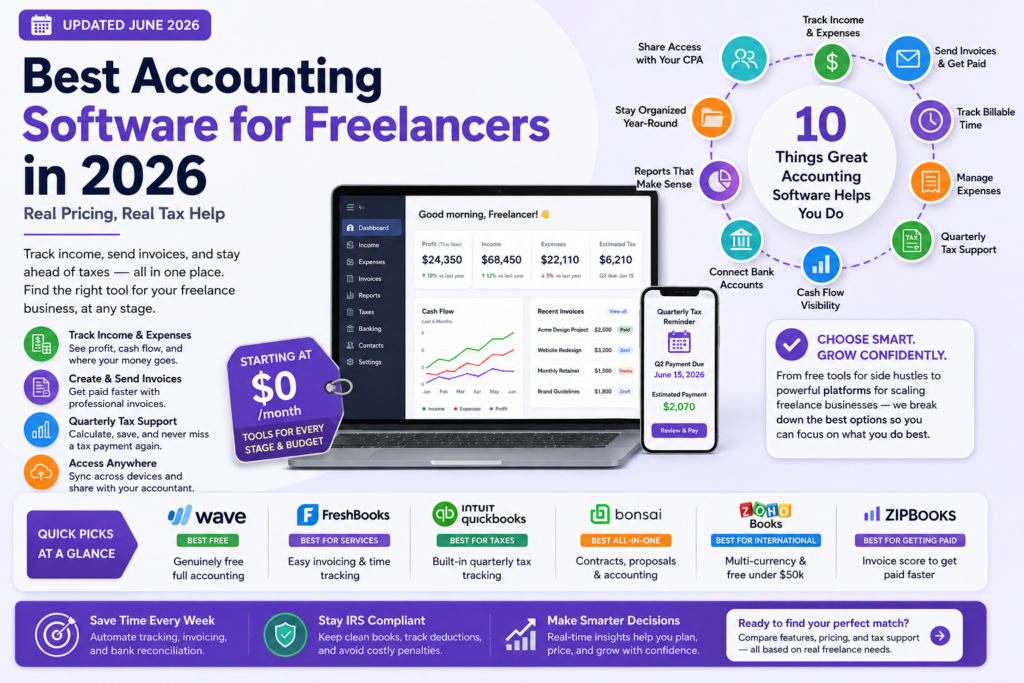
Best Accounting Software for Freelancers in 2026

Quarterly taxes don’t care that you’re three projects deep and behind on invoicing. The best accounting software for freelancers does more than track invoices — it tells you what to set aside for the IRS before the deadline sneaks up on you, something most comparison articles never actually explain. This guide breaks down what each tool costs at real freelance income levels, which ones genuinely help with quarterly estimated taxes, and which platform fits your stage — whether you’re testing a side hustle or running an incorporated freelance business.


Quick Picks: Best Accounting Software for Freelancers

Tool Best For Free Tier Starting Price
Wave Budget-zero freelancers Yes — full accounting Free (transaction fees apply)
FreshBooks Service-based freelancers No (30-day trial) $11/month
QuickBooks Solopreneur Tax-focused freelancers No $20/month
Bonsai Contracts + accounting combo No (trial) $25/month
Zoho Books International freelancers Yes (under $50k revenue) Free / $20/month
ZipBooks Getting paid faster Yes (limited) $15/month


Side-Gig, Full-Time, or Incorporated: Pick Your Stage First

No other guide segments this way, and it’s the fastest way to narrow your choice. Your tool needs change dramatically as your freelance income grows.

  • Side-gig freelancer (under $20k/year): You need free or near-free expense tracking, simple invoicing, and basic profit tracking. Wave or Zoho Books’ free tier covers this completely.
  • Full-time freelancer ($20k–$100k/year): Quarterly estimated taxes become a real obligation. You need a tool that calculates and reminds you of payments. QuickBooks Solopreneur or FreshBooks fit here.
  • Incorporated freelancer ($100k+/year): You likely have a bookkeeper involved and need software your CPA can access directly. Full QuickBooks Online or Xero becomes worth the cost.


💡 Quick check  Look at your last tax bill. Under $3,000 owed → side-gig tools work fine. $3,000–$15,000 → you need quarterly tax support. Above that → talk to an accountant about incorporating.


How to Choose: 5 Questions Before You Sign Up

  • Does it actually help with quarterly estimated taxes? Far fewer tools calculate what you owe quarterly or remind you before the deadline than you’d expect.
  • What’s the real cost including payment processing fees? A ‘free’ tool charging 2.9% per payment isn’t free once you’re collecting $80k/year through it.
  • Can your accountant access it directly? Confirm accountant-level access without sharing your full login if you plan to hire help later.
  • Does it handle multi-currency? Confirm native support if you invoice international clients, rather than manual conversion math.
  • Can you export everything if you switch later? Confirm full CSV or accounting-standard export before committing.


Best Accounting Software for Freelancers: Tool Reviews

Wave — Best Free Option for Budget-Zero Freelancers

Best for: Side-gig and early-stage freelancers

Genuinely free: Yes — full double-entry accounting at no monthly cost   |   Cost: ~$0/year + transaction fees (2.9% + $0.60/card, 1% ACH)


Wave is the most complete free accounting tool available to freelancers, not a stripped-down trial dressed up as free. The dashboard shows cash flow, bank balances, and a profit and loss graph without ever asking for a credit card.


✅ Pro: Genuinely free core accounting, not a 14-day trial. The friendliest learning curve on this list.

⚠️ Con: No built-in quarterly tax calculator — you’ll need to estimate manually or pair it with a separate tax tool.

🏆 Verdict: Best starting point for any freelancer earning under $30k/year who wants real financial planning tools without spending a cent.


💡 Tip  If you’re testing whether freelancing is sustainable before going full-time, start with Wave’s free tier and revisit once you cross consistent $2,000+ months.


QuickBooks Solopreneur — Best for Quarterly Tax Tracking

Best for: Full-time freelancers who want tax season handled automatically

Genuinely free: No   |   Cost: ~$240/year ($20/month)


Built specifically around the tax problem other tools ignore. Onboarding asks for your industry to surface relevant write-offs, and receipts get scanned via OCR so expenses categorize themselves automatically.


✅ Pro: The only tool here that calculates and tracks quarterly estimated taxes as a core, built-in feature.

⚠️ Con: Limited compared to full QuickBooks Online — no payroll, no inventory, doesn’t scale well once incorporated.

🏆 Verdict: Best choice for full-time freelancers whose biggest pain point is staying ahead of the IRS.


FreshBooks — Best for Service-Based Freelancers and Consultants

Best for: Consultants, designers, anyone billing by project or hour

Genuinely free: No (30-day free trial)   |   Cost: ~$132–$300/year depending on tier and client count


Built its reputation on invoicing and time tracking. Track time directly against a project, pin hours to a client, and convert tracked time into an invoice in two clicks.


✅ Pro: The cleanest, most intuitive invoicing experience available — clients consistently comment on how professional invoices look.

⚠️ Con: Pricing scales by client count, not just features, so consultants with 15+ active clients hit higher tiers fast.

🏆 Verdict: Best for service-based freelancers whose core workflow is tracking billable time and sending polished invoices.


💡 Tip  FreshBooks now offers a Payroll add-on if you start subcontracting work — useful the moment your freelance business starts hiring help.


Bonsai — Best All-in-One for Contracts Plus Accounting

Best for: Freelancers who want contracts, proposals, and bookkeeping in one subscription

Genuinely free: No (free trial available)   |   Cost: $25/month (Pro plan)


Goes beyond pure accounting by bundling contract templates, proposal generation, and automated client onboarding alongside bookkeeping tools.


✅ Pro: The only tool here that handles legal contracts and accounting in a single subscription.

⚠️ Con: Accounting depth is lighter than FreshBooks or QuickBooks — prioritizes breadth over deep financial reporting.

🏆 Verdict: Best for new freelancers who want one tool covering contracts, proposals, and basic bookkeeping.


Zoho Books — Best for International and Multi-Currency Freelancers

Best for: Freelancers with clients outside their home country

Genuinely free: Yes — under $50,000 in annual revenue   |   Cost: $20/month above the free threshold


Handles multi-currency invoicing natively, a feature several competitors treat as an afterthought. If you invoice in euros, pounds, or any foreign currency, Zoho converts and tracks this without manual math.


✅ Pro: Best native multi-currency support of any tool here, plus a real free tier for early-stage international freelancers.

⚠️ Con: Steeper initial learning curve than Wave or FreshBooks, and US-specific tax features are less developed.

🏆 Verdict: Best choice for freelancers working primarily with international clients who need real multi-currency accounting.


ZipBooks — Best for Getting Paid Faster

Best for: Freelancers whose biggest pain point is late-paying clients

Genuinely free: Yes, with limited features   |   Cost: $15/month (Smarter plan)


Standout feature is its Invoice Score — a real-time rating of how complete and payment-friendly your invoice is, based on factors like payment options, clear terms, and a polished note.


✅ Pro: The Invoice Score feature is unique among every tool here and directly addresses getting paid on time.

⚠️ Con: Reporting and tax features are lighter than QuickBooks or FreshBooks — better as a secondary tool.

🏆 Verdict: Worth considering if late payments are your biggest operational headache, paired with a more robust tax tool.


Quarterly Estimated Taxes: The Section Every Other Guide Skips

If you’re self-employed and expect to owe more than $1,000 in taxes for the year, the IRS requires quarterly estimated payments — and missing them triggers penalties even if you pay in full come April.

  • Wave: No built-in quarterly tax calculator. Manually estimate roughly 25–30% of net income or use the IRS Form 1040-ES worksheet.
  • QuickBooks Solopreneur: Calculates estimated quarterly tax liability automatically and sends reminders ahead of each IRS deadline.
  • FreshBooks: Generates profit and loss reports you can hand to an accountant, but doesn’t calculate quarterly payments natively.
  • Bonsai: No native quarterly tax calculator, though the financial dashboard simplifies manual estimation.
  • Zoho Books: No automated US quarterly tax calculation — better suited to international tax complexity.


💡 Try this now  Set a recurring calendar reminder two weeks before each IRS quarterly deadline (April 15, June 15, September 15, January 15) regardless of whether your software reminds you.


AI-Native Bookkeeping Features in 2026

This is genuinely new territory, and not one of the major freelancer accounting comparisons currently covers it.


AI expense categorization: Several tools now learn your specific spending patterns rather than relying on generic category rules.

AI-generated profit and loss summaries: Ask a plain-language question like ‘how did I do this quarter?’ and get a written summary instead of a spreadsheet.

AI tax-deduction finders: AI-driven analysis can flag deductions you may have missed based on patterns in your specific spending.


💡 Get started  When evaluating any tool in 2026, ask directly whether AI features are included in your current tier or gated behind a higher-priced plan.


Full Comparison Table: Real Cost and Tax Support

Tool Free Tier Cost at $50k Revenue Quarterly Tax CPA Access
Wave Yes (full) ~$0 + fees No (manual) Limited
QuickBooks Solopreneur No ~$240/yr Yes (auto) Yes
FreshBooks No (trial) ~$132–$300/yr No (reports) Yes
Bonsai No (trial) ~$300/yr No (manual) Limited
Zoho Books Yes (<$50k) $0–$240/yr No (intl) Yes
ZipBooks Yes (limited) ~$180/yr No Limited


International Freelancers: What to Look For

If you work with clients across borders, your accounting needs differ from a domestic freelancer in ways most US-centric guides ignore entirely.

  • Multi-currency invoicing should convert and track foreign currency payments automatically. Zoho Books leads here among the tools in this guide.
  • Cross-border payment fees vary by platform — confirm the total fee stack including foreign transaction fees before committing.
  • Tax treaty awareness matters for clients in countries with tax treaties — consult a tax advisor familiar with international freelance income.
  • Language and localization matters if any workflow needs to happen outside English — Zoho Books’ broader localization is a genuine differentiator.


Common Deductions These Tools Help You Track

Beyond categorizing expenses, the real value of good expense tracking is catching deductions freelancers commonly miss.

  • Home office deduction: Tools with receipt scanning (FreshBooks, QuickBooks Solopreneur) make it easier to isolate this percentage consistently.
  • Software and subscriptions: Generally deductible — AI-categorization increasingly catches these automatically.
  • Mileage and travel: QuickBooks Solopreneur includes built-in mileage tracking via its mobile app.
  • Health insurance premiums: Typically requires coordination with a tax preparer rather than automatic detection.
  • Retirement contributions: SEP-IRA and Solo 401(k) contributions reduce taxable income — worth a conversation with a financial advisor.


💡 Explore further  None of the tools in this guide replace a tax professional for complex deductions. Use the software for day-to-day tracking, and bring a clean year-end report to a CPA.


Recordkeeping: What the IRS Actually Requires

  • Keep every receipt for business expenses over $75, ideally everything — OCR scanning removes the friction of doing this consistently.
  • Separate business and personal accounts if you haven’t already — mixing the two is the biggest reason freelancer books become unmanageable.
  • Retain records for at least three years, though many accountants recommend seven given IRS audit windows.
  • Track payment method alongside every transaction — important for reconciling against bank statements.


FAQ: Accounting Software for Freelancers

What is the cheapest accounting software for freelancers?

Wave is the cheapest genuinely complete option — full double-entry accounting at no monthly cost, with fees only applied to actual payment transactions. Zoho Books is free for freelancers under $50,000 in annual revenue.


Does Wave actually handle quarterly taxes?

No — Wave tracks income and expenses cleanly but doesn’t calculate or remind you of quarterly estimated tax payments. You’ll need to manually estimate using the IRS Form 1040-ES worksheet.


QuickBooks Solopreneur vs. FreshBooks — which should I choose?

Choose QuickBooks Solopreneur if staying ahead of quarterly estimated taxes is your priority. Choose FreshBooks if your core workflow involves tracking billable hours and sending polished invoices.


Is there genuinely free accounting software for self-employed people?

Yes. Wave offers complete double-entry accounting at no cost. Zoho Books is free for freelancers under $50,000 in annual revenue. Both are real, supported products — not time-limited trials.


What accounting tools do freelancers need first?

Start with whichever free tool matches your situation: Wave for domestic freelancers, Zoho Books if you have international clients. Add quarterly tax tracking once your income crosses roughly $20,000–$30,000 a year. Accounting tools for freelancers should scale with you, not force a full migration at every income jump.


How do I switch accounting software without losing my financial history?

Confirm CSV or accounting-standard export support before committing. The real cost of switching isn’t lost data — it’s the time spent re-categorizing transactions, so plan a clean cutover at the start of a new tax year.


Does freelance accounting software help with financial planning beyond taxes?

Yes, to varying degrees. Tools like Wave and QuickBooks Solopreneur show cash flow trends and profit and loss over time, which supports basic financial planning decisions like whether you can afford a slow month or when to raise your rates.


Conclusion

The best accounting software for freelancers isn’t the tool with the most features — it’s the one that matches your actual revenue stage and actually helps with the tax obligation that causes the most stress every quarter. Start free with Wave or Zoho Books if you’re early-stage. Move to QuickBooks Solopreneur the moment quarterly estimated taxes become a real number on your calendar.


Every freelance accounting software comparison will tell you pricing is simple. It rarely accounts for payment processing fees at your actual revenue, or whether the tool helps you avoid an IRS penalty come January. Confirm both before you commit.

Leave a Comment

Your email address will not be published. Required fields are marked *