
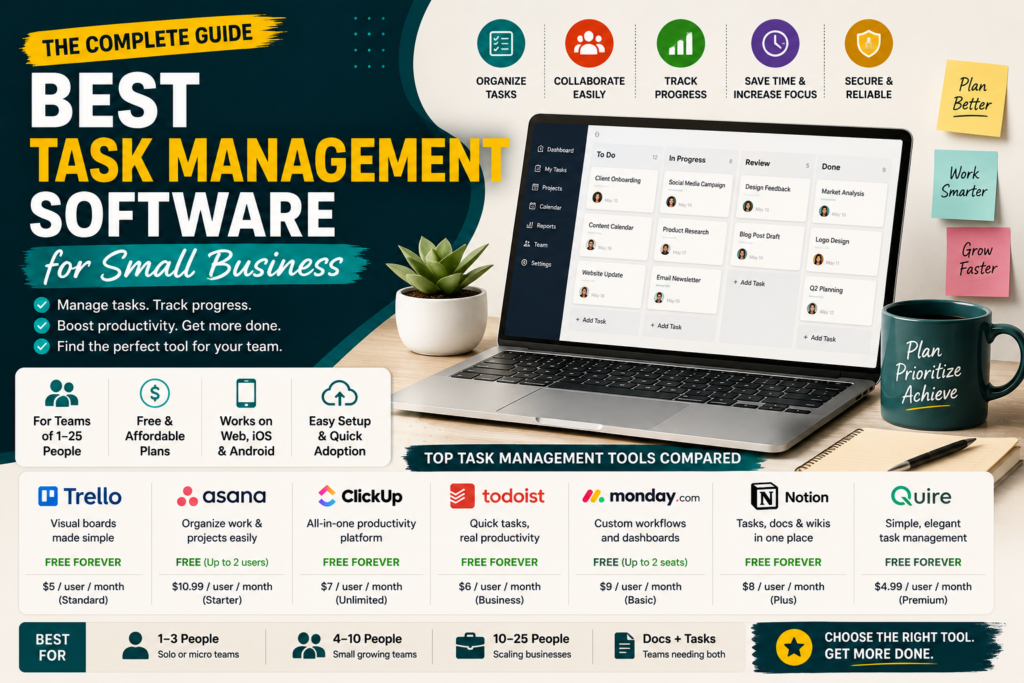
A plain, independent comparison with no product of our own to sell.
Most roundups of task management software for small business quietly include tools built for companies with hundreds of employees and dedicated IT teams. If you run a team of five or fifteen people, half of that advice does not apply to you. This guide sticks strictly to tools that actually fit small teams, tells you exactly which free plans are honest and which ones are trials in disguise, and shows what a real team of five or ten would actually pay each month. You will also get a straightforward look at security, mobile access, and how to move off spreadsheets without losing a week of work. No product here is ours, so there is no pressure to steer you toward one particular answer.
Who This Guide Is Actually For
This roundup focuses on teams of roughly one to twenty five people. If your business has a dedicated IT department, a procurement process, or compliance requirements like HIPAA or SOC 2 audits, your needs are different and larger platforms built for that scale make more sense. For everyone else, the tools below cover what a small business genuinely needs without paying for features that will sit unused.
Free Plans, The Honest Version
Every company calls its entry tier a free plan, but the details vary a lot. Some are genuinely free forever with no time limit. Others are trials that expire in fourteen or thirty days. Here is what each tool actually offers before you commit.
| Tool | Free Plan Type | What It Actually Limits |
| Trello | Free forever | 10 boards per workspace, 250 automation runs a month |
| Asana | Free forever | Capped at 2 team members, no timeline or Gantt view |
| ClickUp | Free forever | Only 60MB total storage, no time tracking or integrations |
| Todoist | Free forever | No team workspaces, built for individual task lists |
| Monday.com | Free forever | Only 2 seats and 3 boards, no automations |
| Notion | Free forever | Limits apply to file uploads and block history on some plans |
| Quire | Free forever | Up to 4 projects and 10 members, fewer views |
The Tools Worth Considering
Trello
Trello’s board and card layout is the fastest thing on this list to learn, which matters when you need a team to adopt something in a day, not a month. It works well for content calendars, simple client pipelines, and small teams that do not need task dependencies.
- Good fit: teams that want visual simplicity over deep features
- Watch for: gets messy once you have multiple overlapping projects
Asana
Asana strikes a balance between structure and flexibility, letting you switch between list, board, and calendar views without forcing one workflow on the whole team. Its Workflow Builder handles repeatable processes like client onboarding without needing technical setup.
- Good fit: small businesses running a few concurrent projects
- Watch for: the free plan caps out at two people
ClickUp
ClickUp packs task management, docs, and basic time tracking into one workspace, which appeals to small teams trying to consolidate several subscriptions into one. The tradeoff is a busier interface than the other tools here.
- Good fit: teams that want to replace three or four separate apps
- Watch for: expect a slower first week while everyone learns the layout
Todoist
Todoist is built around fast, natural language task entry rather than project dashboards, which makes it a strong personal tool that also supports small shared workspaces. A solo founder juggling client work and admin tasks often gets more daily value from Todoist than a heavier platform.
- Good fit: solopreneurs and very small teams of two to four
- Watch for: not built for detailed project timelines or dependencies
Monday.com
Monday.com leans on color coded boards and a large template library, which helps non technical teams get moving quickly. It works particularly well for small agencies that want to share progress with clients directly.
- Good fit: client facing teams that want a polished shared view
- Watch for: minimum seat requirements can push costs up faster than expected
Notion
Notion combines task tracking with documentation and notes in one workspace, so a small team can keep its task board next to its actual project notes instead of switching apps. It takes more setup time upfront than the others.
- Good fit: teams that want tasks and knowledge base together
- Watch for: requires more initial structuring than a ready made board
Quire
Quire is a smaller, lesser known option that keeps things intentionally simple, with nested task lists and a handful of clean views. It suits a small team that knows exactly what it needs and does not want to configure a heavier platform.
- Good fit: very small teams that prefer a lightweight, no frills tool
- Watch for: less name recognition means a smaller support community
What a Real Small Team Actually Pays
Feature lists rarely mention the total bill, so here is what the entry paid tier costs once you add real seats. These numbers are for the lowest paid plan of each tool, not the most advanced one.
| Tool | Entry Paid Price | 5 Person Team | 10 Person Team |
| Trello Standard | $5/user/month | $25/month | $50/month |
| Asana Starter | $10.99/user/month | $54.95/month | $109.90/month |
| ClickUp Unlimited | $7/user/month | $35/month | $70/month |
| Todoist Business | $6/user/month | $30/month | $60/month |
| Monday.com Basic | $9/user/month | $45/month | $90/month |
Checking each company’s own pricing page before you commit is worth doing, since plans and seat minimums shift throughout the year.
Security, Without the Enterprise Jargon
Most small businesses do not need to evaluate SOC 2 audit reports or enterprise identity management. What actually matters at this scale is simpler. Look for two factor authentication, the ability to remove a departing employee’s access immediately, automatic backups, and clear control over who can see which projects. Every tool listed above supports these basics on its paid tier, and that is usually enough protection for a small team handling normal business data.
Mobile Access at a Glance
- Trello: iOS and Android apps with full board access
- Asana: iOS and Android apps, including most desktop features
- ClickUp: iOS and Android apps, though some views work better on desktop
- Todoist: iOS and Android apps built around quick task entry
- com: iOS and Android apps with dashboard access
- Notion: iOS and Android apps, best for reading and quick edits
- Quire: iOS and Android apps with core task features
Moving Off Spreadsheets Without Losing a Week
Most small teams switching to task management software are coming from a shared spreadsheet, and the biggest risk is losing momentum during the move. A short, staged approach works better than trying to migrate everything at once.
- Pick one active project, not your entire workload, to move first
- Recreate your existing columns as fields or labels instead of redesigning your process from scratch
- Run the new tool and the old spreadsheet side by side for one week before fully switching
- Set a specific day to retire the spreadsheet so the transition does not drag on indefinitely
Reading a tool’s own import guide before you start is a smart step, since several of these platforms can pull spreadsheet data in directly rather than requiring manual entry.
Matching a Tool to Your Team Size
- One to three people: Todoist or Quire keep things light without unnecessary structure
- Four to ten people: Trello or Asana cover most everyday project needs
- Ten to twenty five people: ClickUp or Monday.com offer more structure as coordination gets harder
- Teams juggling tasks and documentation together: Notion is worth the extra setup time
Frequently Asked Questions
What is the best task management software for a small business on a tight budget? Trello and Todoist offer the most usable free forever plans, while Asana’s free tier works well for teams of exactly two.
Is free task management software for small business good enough long term? For teams under five people, often yes. Once you need automations, timelines, or more than a couple of users, a paid tier usually pays for itself in saved coordination time.
How is task management software different from full project management software? Task management focuses on individual to do items, owners, and deadlines, while project management software adds timelines, dependencies, and portfolio level reporting on top of that.
How long does it take a small team to fully adopt new software? Most teams are functional within a week and fully comfortable within four to six weeks of regular use.
Can I switch task management tools later without losing my data? Yes. Most platforms support CSV export, which makes moving your tasks to a different tool later a manageable process rather than starting over.
Final Thoughts
The best task management software for small business is not the platform with the longest feature list, it is the one sized correctly for how many people you actually have and what you are actually tracking. Start with your team size, check which free plan is genuinely free rather than a disguised trial, and run a real one week pilot before committing to a paid seat count. Get that part right, and the software fades into the background, which is exactly what it should do.