
An independent look, with no software of our own to sell.
Picking the best chiropractic software usually turns into hours of reading vendor blogs that quietly rank themselves first, or marketplace sites that earn a fee for pointing you toward certain products. Neither is exactly lying to you, but neither is giving you the full picture either. This article looks at chiropractic software the way an actual buyer needs to see it, with real starting prices side by side, the hidden costs vendors mention only in passing, and a clear answer to which type of practice actually needs which tool. You will also get a straight answer on whether the AI documentation claims floating around the industry hold up. By the end, you should be able to shortlist two or three real options instead of staring at a tenth listicle.
Table of Contents
The Features Worth Actually Checking For
Feature lists across vendor pages tend to blur together, so it helps to know which items genuinely separate the best chiropractic software from a tool that just looks the part on a brochure.
- Chiropractic specific SOAP note templates, not generic medical note fields relabeled
- A built in or directly integrated clearinghouse for insurance claims, rather than a manual export to a separate billing tool
- Role based permissions, so front desk staff and providers see only what they need
- Automated appointment reminders through text or email, since no shows directly affect revenue
- A patient portal for intake forms and secure messaging, which cuts down front desk workload
- Audit trails and HIPAA compliant storage, which matters for both legal protection and insurance audits
If a vendor cannot clearly answer how their software handles even one of these, that is worth treating as a real gap rather than a minor detail.
What Chiropractic Specific Software Adds Over Generic EHR
A general medical Electronic Health Records system can technically run a chiropractic office, but it usually forces you to build your own version of things chiropractic software already ships with. Subluxation documentation, spinal health indicators, adjustment technique fields, and care plan tracking are standard in chiropractic care software, not add ons you configure yourself. The other real difference is billing. Chiropractic claims use codes and modifiers that generic billing tools handle poorly, which is exactly why most chiropractic software includes a clearinghouse connection built in rather than bolted on.
If your practice is purely cash based with no insurance claims at all, this gap matters less, and a lighter general practice tool can work fine. If you bill insurance regularly, chiropractic specific software earns its cost back quickly just through fewer claim rejections.
Best Chiropractic Software Pricing, Compared Side by Side
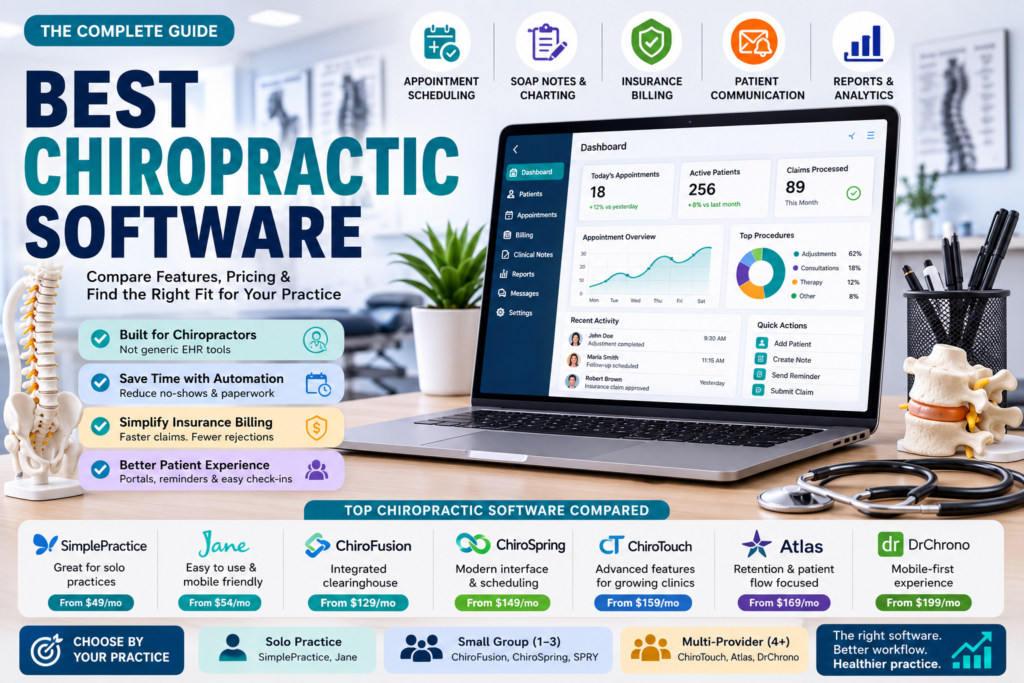
Every vendor publishes its own price on its own page, which makes actual comparison harder than it should be. Here is what the most commonly discussed chiropractic EHR software options charge to start, pulled together in one place.
| Software | Starting Price | Best Known For | Practice Size |
| SimplePractice | $49/month | Client portal and telehealth | Solo to small |
| Jane | $54/month | Mobile access and ease of use | Solo to medium |
| Genesis Chiropractic Software | $97/month | Customizable templates | Small to medium |
| ChiroFusion | $129/month | Integrated clearinghouse | Small to medium |
| ChiroSpring | $149/month | Clean dashboard and scheduling | Small to medium |
| SPRY | $150/month | AI assisted documentation | Small to medium |
| ChiroTouch | $159/month | Full feature depth for established clinics | 1 to 10 providers |
| Atlas Chiropractic System | $169/month | Patient flow and retention tools | High volume |
| DrChrono | $199/month | Mobile first design | Any size |
| Kareo | $249/month | Billing tools | Small independent |
| ChiroHD | $299/month | Deep customization | Growing practices |
Checking each vendor’s current pricing page directly before you commit is still worth doing, since these numbers shift and most vendors add per provider fees once you go past a single user.
A Few Worth a Closer Look
- Jane and SimplePractice both lean toward ease of use and a strong patient portal, which suits solo providers who do not want a steep learning curve
- ChiroFusion includes an integrated clearinghouse at its base price, which is unusual at its price point and worth confirming still holds if you are comparing current offers
- ChiroTouch and ChiroHD both carry more configuration depth, which matters more once you have several providers with different charting preferences
- SPRY and DrChrono both push AI assisted documentation and mobile access as their main selling points, worth testing directly in a live demo rather than taking the marketing at face value
Solo Practice, Small Group, or Multi Provider, the Real Thresholds
Most guides tell you to consider your practice size without saying what that actually means in practice. Here is a more concrete way to think about it.
- One provider, mostly cash based: a lighter tool like SimplePractice or Jane covers scheduling and notes without paying for billing depth you will not use
- One to three providers with regular insurance billing: this is where ChiroFusion, ChiroSpring, or SPRY tend to fit, since claims volume starts to justify a built in clearinghouse
- Four or more providers, or multiple locations: ChiroTouch, DrChrono, or ChiroHD carry the reporting depth and role based permissions that larger teams actually need
If you are not sure which bucket you fall into, count how many claims your office submits in a typical week. Under twenty and cash flow feels manageable, a lighter tool is usually enough. Well past that, the billing automation in a heavier platform starts paying for itself.
Cash Based Versus Insurance Billing, a Distinction Worth Taking Seriously
Several vendors, ChiroTouch included, actually sell separate product tiers built around this exact split, which tells you it matters more than most articles treat it. A cash based practice mainly needs fast charting, simple invoicing, and a smooth patient booking experience. An insurance billing practice needs claim scrubbing, eligibility checks, denial tracking, and a clearinghouse relationship that actually works, since a rejected claim costs real money and real time to fix.
Before shortlisting any best chiropractic software option, decide honestly which category your practice falls into today, not which one you hope to grow into. A cash based practice paying for heavy insurance billing tools is paying for a claims engine that never runs.
The Cost of Leaving, Not Just the Cost of Joining
This is the part almost nobody puts front and center. Switching software later is not free, and in at least one well known case it is genuinely expensive. Kareo has been reported to charge as much as $200,000 for a full data export, a detail that usually appears as a single line buried in a pros and cons list rather than something buyers are warned about clearly.
Before signing with any chiropractic software provider, ask directly what it costs to export your full patient history if you ever switch, and get the answer in writing. A vendor that offers free data import when you join but charges heavily to export when you leave is a red flag worth weighing against whatever discount got you in the door.
Are the AI Documentation Claims Actually True
Several chiropractic EHR software vendors now advertise specific percentage improvements from AI charting tools, numbers like a 40 percent reduction in documentation time or a 92 percent reduction depending on which vendor’s page you read. These figures come from the vendors themselves, not from an independent study, and they are not directly comparable since each company measures its own baseline differently.
That does not mean AI charting is useless. Providers switching from fully manual SOAP notes to any structured, template assisted system usually do see a real time savings, often somewhere in the range vendors describe. The honest takeaway is to treat the specific percentage as marketing rather than a guaranteed result for your office, and ask a vendor during a demo to show you an actual note being generated in real time rather than accepting the number at face value.
Switching Software Without Losing a Month
- Request your full patient data export in a standard format before you sign anything with a new vendor
- Run the new system alongside your current one for two to three weeks rather than cutting over in a single day
- Train front desk staff on scheduling and check in first, since that is what patients notice immediately
- Migrate active care plans last, once staff are comfortable navigating the new charting screens
A good vendor will offer free data import as part of onboarding, which several of the software listed above already do, so it is fair to ask for this rather than assume it costs extra.
The best chiropractic software for your practice depends less on star ratings and more on matching the tool to how you actually bill and how many providers you run. A solo cash based office and a five provider insurance heavy clinic are not shopping for the same product, even though most roundups hand them the same top three names. Use the pricing table above as a starting point, confirm the real cost of leaving before you join, and treat every AI percentage claim as a starting point for questions during your demo, not a settled fact.