
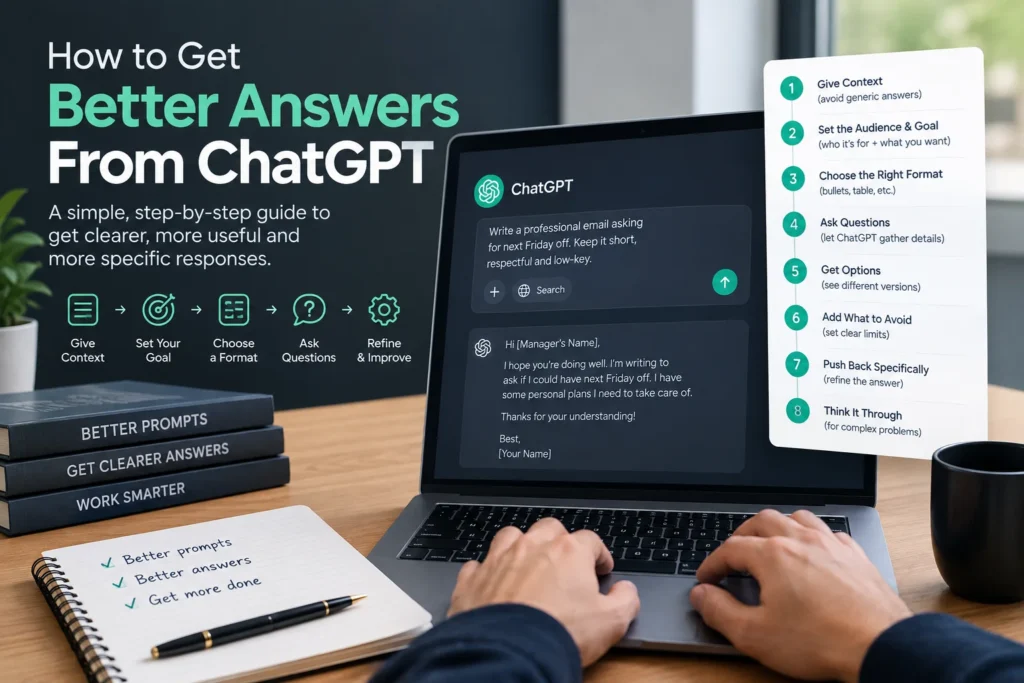
You ask ChatGPT a question, get back something flat and generic, and close the tab wondering what everyone else seems to know that you don’t. Learning how to get better answers from ChatGPT is not about finding secret magic words, it is a short, repeatable sequence of habits that works the same way every time. This guide walks through that sequence step by step, from the first thing to add to any prompt through the settings that save you from retyping yourself constantly, and includes the safety habit most guides on this topic skip completely.
Before anything else: never type a password, bank detail, Social Security number, or private medical information into ChatGPT, even inside a long prompt. Treat it the way you would treat a message you are not fully sure stays private.
Table of Contents
Step by Step: The Sequence That Actually Works
Each step below builds on the last. Together they form a repeatable process you can run through for almost any task.
Step 1: Give Context Before You Give the Task
A task with no background forces ChatGPT to guess, and a generic guess produces a generic answer. Spending an extra thirty seconds on context is the single highest value habit on this list.
Weak:
Write an email asking for a day off.
Better:
I need to ask my manager for next Friday off. We have a good relationship but she is stressed about an upcoming deadline. Keep the tone low-key, not overly formal, not a big deal.
Step 2: Separate Who It’s For From What It’s Actually For
Most people stop at naming the audience and skip the deeper layer, the actual goal the response needs to achieve. These are not the same thing, and naming both produces a noticeably more useful answer.
| Layer | Question it answers | Example |
| Audience | Who is reading or using this? | “This is for my manager, who is busy and prefers short messages.” |
| End goal | What does this response need to accomplish? | “The goal is to fix the situation, not to win the argument.” |
An audience tells ChatGPT how to sound. A goal tells it what actually matters in the response, which is often the piece that is missing even from a fairly detailed prompt.
Step 3: Specify the Format You Actually Need
ChatGPT will not add structure you never asked for. If you need headers, numbered steps, a table, or a short paragraph instead of a wall of text, say so directly.
- “Give me 5 bullet points, no more than one sentence each.”
- “Write this as a short FAQ with 4 questions.”
- “Put this in a table I can copy straight into a spreadsheet.”
That last one is worth trying literally. ChatGPT can output a real table, and copying it directly into Excel or Google Sheets keeps the rows and columns intact. For data heavy tasks, you can also ask for CSV, HTML, or even a Python Pandas dataframe format if you are working in code.
Step 4: Let ChatGPT Ask You Questions Instead of Guessing
This is a genuinely underused technique, and it solves a problem the first three steps cannot: you often don’t know what information matters until you’re asked for it.
Before you answer, ask me whatever questions you need to understand what I actually want.
A closely related version of this same idea works just as well: ask ChatGPT to generate several different versions of a prompt for your task, then tell it which one to actually use. Either way, you are letting ChatGPT help gather the missing pieces instead of guessing on your behalf.
Step 5: Ask for Options When You’re Not Sure What You Want
Give me three different opening lines for this email, one formal, one casual, one in between.
Seeing a few real options side by side often makes it obvious what you actually wanted, even when you could not have described it clearly upfront.
Step 6: Tell It What to Avoid, Not Just What to Include
Constraints shape a response just as much as instructions do.
- “Don’t use the word synergy or any corporate buzzwords.”
- “No bullet points, I need flowing prose.”
- “Keep it under 100 words, short enough to paste into a text message.”
Step 7: Push Back Specifically Instead of Starting Over
The most common mistake at this stage is getting a mediocre answer and either giving up or retyping the whole prompt from scratch. Treat it as a conversation instead.
- “That’s too long, cut it in half.”
- “The third point isn’t relevant, replace it with something about [X].”
- “Close, but what I actually meant was [clarification].”
ChatGPT responds well to a specific, narrow correction. A vague “make it better” rarely gets you much further than the first attempt did.
Step 8: Ask It to Reason Through Complex Problems First
Think through this step by step before giving me your final answer.
For anything involving planning, comparison, or genuine analysis, asking ChatGPT to work through its reasoning before committing to a conclusion tends to surface details a rushed, direct answer skips over entirely.
Step 9: Ask ChatGPT to Rate Its Own Confidence
This is one of the most valuable and least known techniques for getting trustworthy answers, especially for anything factual.
When your answer includes facts, tell me your confidence level and include a real source URL. If you are speculating or predicting something, say so clearly.
This will not make ChatGPT infallible, nothing does, but it builds a habit of treating confident sounding answers with the right amount of scrutiny instead of accepting them automatically, which matters most for anyone newer to using AI tools.
Save Your Preferences Once Instead of Repeating Them
Everything above works inside a single prompt. If you find yourself typing the same tone, audience, or format preference into every conversation, ChatGPT has a setting built specifically to fix that.
Open your profile icon and look for Custom Instructions. Here you can tell ChatGPT what you do, how you want responses formatted by default, and even set a standing rule like “when I ask for code, give me only the code, no explanation” so you never have to repeat it again. This single setting is worth setting up once if you use ChatGPT regularly, since it quietly improves every conversation that follows.
A Quick Myth Worth Correcting
Some older articles on this topic still claim ChatGPT’s knowledge stops at 2021 and that it cannot access current information. That has not been accurate for a long time. Current versions of ChatGPT can browse the web for up to date information and run on far more recent training data, so do not assume you need to work around a limitation that no longer applies. If you are unsure what a specific version can currently do, checking OpenAI’s own help documentation is more reliable than an old blog post.
Staying Safe While You Do This
- Never share passwords, bank account numbers, Social Security numbers, or private medical details, even as part of a detailed prompt
- Do not assume ChatGPT remembers every past conversation by default, memory behavior depends on your specific settings and plan
- Double check anything factual that actually matters, especially names, dates, numbers, and anything you plan to act on
- Treat ChatGPT as a capable assistant you still need to review, not a source you accept without question
Putting the Whole Sequence Together
| Step | What it fixes |
| 1. Add context | Generic, guessed answers |
| 2. Separate audience from goal | Responses that sound right but miss the real point |
| 3. Specify format | Unstructured walls of text |
| 4. Let it ask questions | Missing details you didn’t think to mention |
| 5. Ask for options | Not knowing what you actually wanted |
| 6. State what to avoid | Responses that technically answer but miss the tone |
| 7. Push back specifically | Wasting time starting over from scratch |
| 8. Ask for step by step reasoning | Shallow analysis on complex questions |
| 9. Ask for confidence and sources | Trusting a wrong answer that sounded right |
Frequently Asked Questions
Why does ChatGPT give generic answers even when I’m specific?
Check whether you have named both the audience and the actual goal of the response. Many detailed prompts still miss the goal, which is often the piece that shapes the answer the most.
What is the single most useful ChatGPT prompting tip?
Giving context before stating the task. A short task with real background consistently outperforms a longer, more complicated prompt that skips context entirely.
Can I get ChatGPT to remember my preferences automatically?
Yes, through Custom Instructions in your account settings, which apply your preferences to every new conversation without needing to restate them each time.
Is it safe to paste long documents or personal information into ChatGPT?
Documents without sensitive content are generally fine. Avoid pasting passwords, financial account details, government ID numbers, or private medical information under any circumstances.
Conclusion
Getting better answers from ChatGPT really comes down to working through this sequence instead of typing one vague request and hoping for the best: add real context, separate who the answer is for from what it needs to achieve, specify the format, let ChatGPT help gather missing details, and push back specifically rather than starting over. Save your recurring preferences in Custom Instructions so you stop repeating yourself, and keep a healthy habit of checking confidence and sources on anything factual. Run through these steps on your very next prompt, and the difference in what comes back will be obvious immediately.