
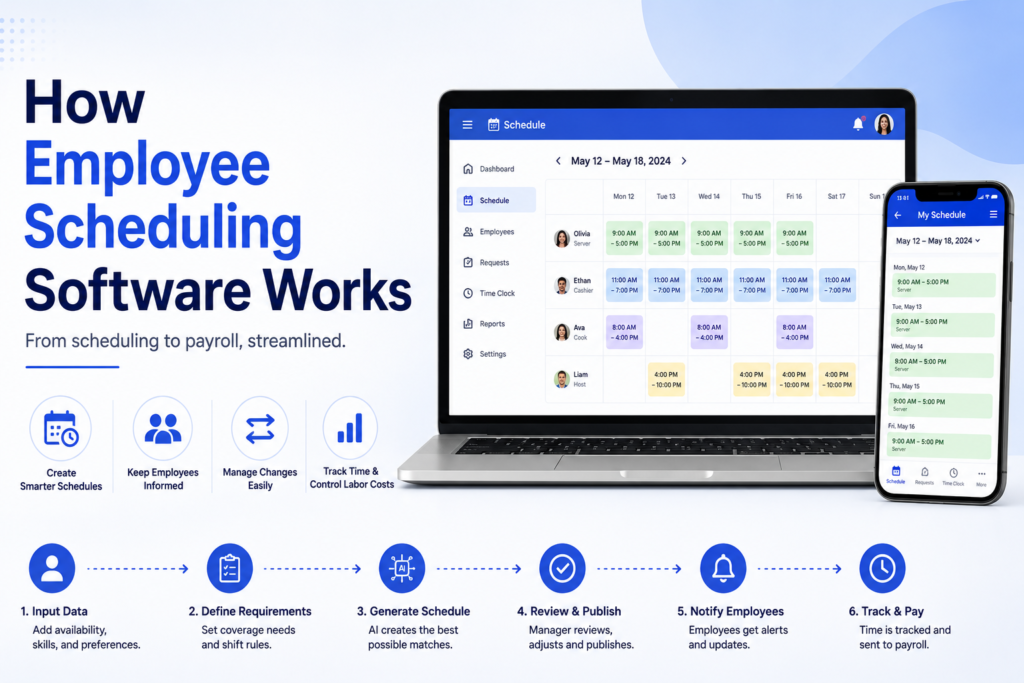
If you’ve ever wondered how employee scheduling software works behind the scenes, most explanations either stay too vague to be useful or turn into a sales pitch for one specific product. This guide takes a different approach: we break down exactly what happens from the moment a schedule is created to the moment an employee’s paycheck reflects their actual hours worked, grounded in how real, named tools handle each step. You’ll also get the security questions worth asking before you trust any platform with employee data, and a breakdown of how the process shifts depending on your industry. By the end, you’ll understand the actual mechanics, not just the marketing language, behind how employee scheduling works.
Table of Contents
What Is Employee Scheduling Software?
Employee scheduling software is a digital system that automates the process of creating, distributing, and adjusting employee work schedules. It replaces manual methods like spreadsheets and paper calendars with a centralized platform that considers employee availability, labor laws, and business demand simultaneously.
At a basic level, the software takes in data (who’s available, what skills are needed, how many people are required per shift) and outputs a schedule that satisfies as many of those constraints as possible, while flagging anything it can’t resolve automatically.
How Employee Scheduling Software Works: The Core Process
Understanding how employee scheduling software works is easiest when you follow the actual sequence of events, from initial setup through to a completed pay period.
Step 1: Employee data and availability input
Before any schedule can be built, the system needs a foundational dataset: each employee’s availability, skills, certifications, and any standing preferences (like a preference for morning shifts). Most platforms let employees update their own availability directly, rather than requiring a manager to collect this information manually.
Step 2: Demand and coverage requirements are defined
Managers input how many people, and often which specific skills, are needed for each shift or time block. In a restaurant, this might mean two servers and one host during lunch. In a hospital, it might mean a specific ratio of registered nurses to patients. This step defines the target the software is trying to hit.
Step 3: The scheduling algorithm generates a draft
This is where the actual automation happens. The software’s algorithm cross-references employee availability against coverage requirements, applying constraints like maximum weekly hours, minimum rest periods between shifts, and required certifications. Tools like Deputy and Humanity use AI-assisted forecasting at this stage, using historical demand data to predict staffing needs before a manager even opens the schedule.
Step 4: Conflict detection and flagging
Rather than silently failing when something doesn’t fit, quality scheduling software flags problems directly: double-bookings, understaffed shifts, or an employee scheduled too close to overtime thresholds. This step is what separates automated scheduling from a static spreadsheet, since the system is actively checking its own work.
Step 5: Manager review and manual adjustment
Even with strong automation, a human still typically reviews the draft schedule. Managers can drag and drop shifts, manually override the algorithm’s suggestions, and apply judgment the software can’t fully replicate, like knowing two specific employees don’t work well together on the same shift.
Step 6: Schedule publication and employee notification
Once finalized, the schedule is published, and employees are notified automatically, usually through a mobile app, email, or text. Platforms like When I Work and Sling send push notifications the moment a schedule goes live, along with reminders closer to each employee’s actual shift.
Step 7: Ongoing changes, shift swaps, and time-off requests
A published schedule isn’t static. Employees request time off, swap shifts with coworkers, or pick up open shifts, all typically routed through the same platform. Connecteam and 7shifts both allow shift swaps to require manager approval or happen automatically if the employees involved meet the same qualification requirements.
Step 8: Time tracking and payroll integration
As shifts happen, many platforms connect scheduled hours to actual clocked hours, flagging discrepancies and feeding accurate data into payroll. This closes the loop between the schedule that was planned and what actually happened, which matters enormously for accurate compensation.
The Technology Behind the Process
It’s worth understanding a bit about what’s actually happening computationally, since this explains why some tools handle complex scheduling better than others.
Constraint-based optimization is the core technique most scheduling software relies on. The system is given a set of hard constraints (an employee can’t work two shifts at once, certain roles require specific certifications) and soft preferences (an employee prefers evening shifts), then searches for a schedule that satisfies every hard constraint while optimizing as many soft preferences as possible.
Demand forecasting adds a predictive layer on top of this. By analyzing historical sales, foot traffic, or patient volume data, the software can suggest staffing levels before a manager manually estimates them. This is increasingly common in retail and hospitality, where demand fluctuates predictably by day of week and season.
Fairness algorithms track how shifts, particularly undesirable ones like holidays or weekends, are distributed over time, rotating them across the team rather than defaulting to whoever’s easiest to schedule. This detail rarely gets explained clearly, but it’s a meaningful part of how modern employee scheduling avoids the resentment that comes from perceived favoritism.
Key Features That Power Employee Scheduling
Several core features work together to make the process described above function smoothly:
- Drag-and-drop schedule builders let managers manually adjust an automated draft without needing to rebuild it from scratch
- Mobile access ensures employees can view schedules, request changes, and receive notifications from anywhere
- Shift marketplace or open shift boards let employees claim available shifts directly, reducing the manual work of finding coverage
- Labor cost tracking shows real-time spending against budget as the schedule is built, not after the fact
- Compliance rule engines automatically apply relevant labor laws, like required break periods or overtime thresholds, based on your location
How the Process Differs by Industry
The underlying mechanics stay similar, but how they’re applied shifts significantly depending on your industry.
Retail scheduling leans heavily on demand forecasting, since foot traffic and sales patterns are relatively predictable by day and hour. Tools that integrate with point-of-sale data, like Deputy and Homebase, can align staffing directly with expected transaction volume.
Healthcare scheduling adds a layer most other industries don’t deal with: certification and credential tracking. The software has to know not just who’s available, but who’s actually qualified to work a given shift based on licensure, and it needs to maintain 24/7 coverage without gaps.
Restaurants and hospitality deal with high shift-swap frequency and tip tracking alongside the base scheduling function. 7shifts, built specifically for this industry, layers tip management and labor cost percentage tracking directly into the scheduling process.
Manufacturing scheduling often needs to align staffing with production runs and equipment availability rather than customer demand, and frequently involves coordinating shift handovers between rotating crews working around the clock.
Security and Data Privacy: What to Understand
Employee scheduling software holds sensitive personal information, availability patterns, contact details, and in healthcare settings, certification and licensing data, yet this rarely gets explained clearly in guides about how the software works. A few things worth understanding:
- Role-based access control determines who can see and edit what. A shift lead typically shouldn’t have the same editing permissions as a general manager.
- Data encryption should apply both in transit (as data moves between the app and server) and at rest (as it’s stored), a baseline expectation for any platform handling personal employee data.
- Compliance certifications like SOC 2 indicate a vendor has been independently audited on its security practices; it’s reasonable to ask directly if a platform doesn’t publish this information clearly.
- Data retention policies matter particularly for former employees, confirm how long their information stays in the system after they leave.
Since this data determines who gets paid what, and includes real personal information, it’s worth treating security as a genuine evaluation criterion rather than an afterthought.
Common Challenges in the Scheduling Process
Even with capable software, a few recurring problems show up across organizations:
- Over-reliance on automation without review can produce technically valid schedules that still miss context a manager would catch, like team dynamics or an employee’s known preference.
- Incomplete availability data undermines the entire process, since the algorithm can only work with what employees actually input.
- Ignoring fatigue and rest requirements between shifts, particularly in industries with rotating or overnight shifts, can create both compliance risk and genuine employee wellbeing concerns.
- Underestimating training time for both managers and employees, since even intuitive software benefits from a short onboarding period before full adoption.
Frequently Asked Questions
How does employee scheduling software actually create a schedule?
It cross-references employee availability, required skills, and coverage needs against a set of constraints like labor laws and maximum hours, using an algorithm to generate a draft schedule that a manager then reviews and adjusts before publishing.
Does employee scheduling software replace managers?
No. It automates the repetitive calculation work, but managers still typically review and adjust the generated schedule, applying judgment the software can’t fully replicate.
How do employee shifts get communicated once a schedule is finalized?
Most platforms send automatic notifications through a mobile app, email, or text message the moment a schedule is published, along with reminders as each employee’s shift approaches.
Is employee data safe in scheduling software?
It should be, provided the platform uses encryption, role-based access controls, and ideally holds independent security certifications like SOC 2. It’s reasonable to ask a vendor directly about these practices before adopting their software.
Does how employee scheduling works change based on industry?
Yes. The core mechanics stay similar, but the priorities shift, retail leans on demand forecasting, healthcare requires certification tracking and continuous coverage, and hospitality deals with high shift-swap frequency and tip tracking.
Conclusion
How employee scheduling software works ultimately comes down to a structured, repeatable process: gathering availability data, applying business rules and constraints, generating a draft through algorithmic optimization, and closing the loop through notifications, shift changes, and payroll integration. Understanding each step makes it much easier to evaluate whether a specific platform actually fits how your business operates, rather than judging it purely on marketing claims. Whatever tool you’re considering, ask directly about its security practices, confirm how it handles your specific industry’s requirements, and remember that even the most capable automation still benefits from a manager’s final review before a schedule goes live.