
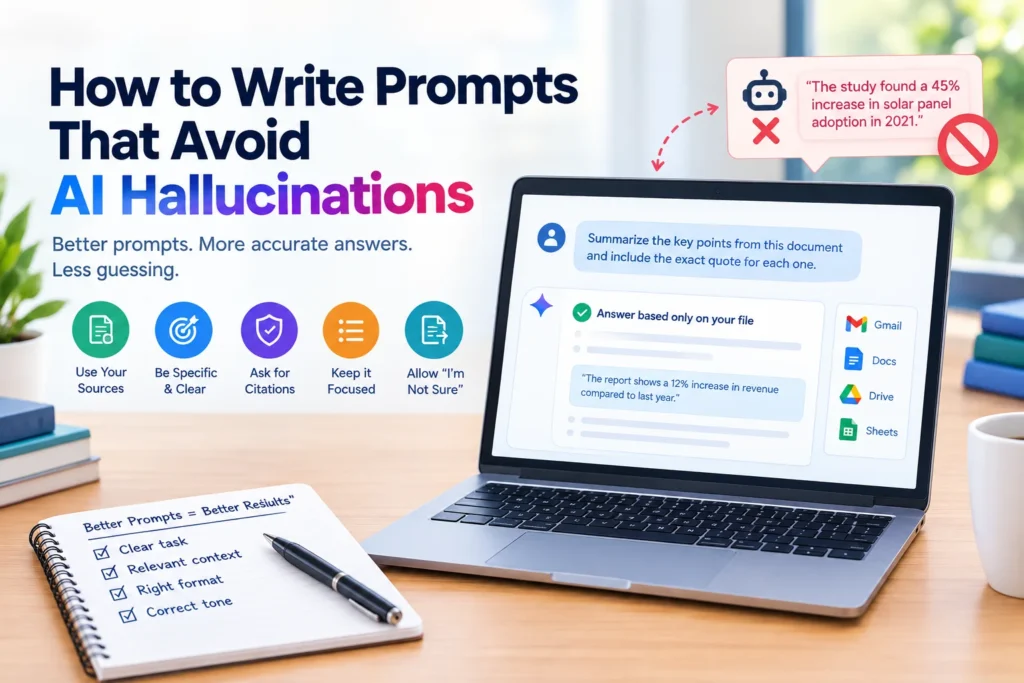
To stop AI hallucinations, paste your source material into the prompt, tell the model to answer only from that text, and give it permission to say “I don’t know” instead of guessing. Those three moves fix most problems — this guide sorts the rest by how much control you have, from everyday chat up to team-level systems.
In 2023, two New York lawyers filed a court brief full of case citations that looked perfect and did not exist, because ChatGPT had invented them, and the lawyers were sanctioned. That story shows why learning how to write prompts that avoid AI hallucinations matters far beyond a casual chat. The good news is that your wording can cut fabricated answers down noticeably, even though no prompt can remove them completely. This guide sorts the techniques by what you can actually control, shows copy and paste prompts you can use today, settles a confusing debate about step by step reasoning, and ends with a checklist for verifying any answer before you trust it. Read on and you will know exactly what to change in your next prompt.
Table of Contents
What is an AI hallucination, really?
An AI hallucination is an answer that sounds confident and fluent but is wrong or made up. It can be an invented statistic, a book that was never written, a quote nobody said, or a feature a product does not have.
It happens because a language model predicts likely words, not verified facts. When it lacks the information you asked for, it does not stop. It fills the gap with whatever sounds most plausible. Training also tends to reward confident answers over honest uncertainty, so the model rarely volunteers that it is guessing.
Your prompt can change two things: how much real information the model has in front of it, and whether admitting uncertainty counts as an acceptable answer. Almost every technique below pushes on one of those two levers.
How much control do you actually have over hallucinations?
Effective AI hallucination prevention works in layers, yet most guides mix up advice meant for very different readers. Here is a simpler way to sort it.
| Level | Who it fits | What you can control |
| One | Anyone using a chat app | The wording of each prompt and the material you paste in |
| Two | People writing system prompts or using an API | Standing rules, settings, and tools like web search |
| Three | Teams building products | Retrieval systems that feed the model approved documents |
If you only chat with an AI tool, Level One is where your results come from. Levels Two and Three matter if you build or manage something other people rely on.
How to Write Prompts That Avoid AI Hallucinations in Everyday Chat
These five habits work in any chat tool and take seconds to apply.
Paste the source and tell the model to stay inside it
The single strongest move is to give the model the facts and limit it to them. Asking about a report from memory invites guessing. Pasting the report and asking about it does not.
Try this pattern:
“Answer using only the text below. If the answer is not in the text, say ‘Not found in the text.’ Do not use outside knowledge.
Text: [paste your material]
Question: [your question]”
This works because you replaced the model’s memory with a document it can actually read, and you told it what to do when the document falls short.
Give it permission to say it does not know
Models behave as if they must always produce an answer. You have to say otherwise, out loud.
Add a line like this to your prompt:
“If you are not confident, say ‘I am not sure’ instead of guessing. Never invent sources, names, numbers, or quotes.”
Expect a few more refusals. That is a feature. An honest “I am not sure” costs you thirty seconds, while a confident fake costs far more.
Ask for the supporting quote
When you ask for an answer, also ask for the exact sentence from your source that backs it up. A claim with a quote is easy to check. A claim with no quote is a warning sign.
Example: “For each point, include the exact sentence from the text that supports it.”
Narrow the question and split big tasks
Broad requests like “tell me everything about this industry” leave huge room for improvisation. Narrow ones leave very little.
Compare these two:
Broad: “Explain the economy of Japan.”
Narrow: “Using the figures below, summarize Japan’s reported GDP growth in two sentences.”
For larger jobs, break the work into stages, such as extract the facts first, then analyze them, then write the summary. Each stage is small enough for the model to stay grounded.
Use a structure with an escape hatch
Free flowing paragraphs let a model smooth over gaps with invented details. A fixed structure forces it to show the gaps instead.
Example: “Return a list with these fields: name, job title, years of experience, certifications. If any field is not stated in the text, write ‘not stated’ instead of guessing.”
The words “not stated” give the model an acceptable way out, which is exactly what stops it from inventing something.
Does Step by Step Reasoning Reduce Hallucinations?
You will see conflicting advice here. Some guides say asking the model to think step by step reduces errors. Others warn it can make fabrication worse. Both have a point.
Step by step reasoning, often called chain of thought, genuinely helps with logic puzzles, math, and tasks where the answer depends on working through stages in order. It does not help much when the question is simply whether a fact is true. In those cases a longer explanation just gives the model more room to produce confident sounding supporting details that may be wrong. A tidy chain of reasoning can even make a false answer look more trustworthy.
A simple rule: use step by step reasoning for problems that need working out, and use grounding in a source when you want to make AI give factually accurate answers. When you need both, supply the facts first, then ask for the reasoning.
A related method designed for factual accuracy is Chain of Verification, described in published research from Meta. The model drafts an answer, writes questions that would check that draft, answers those questions on their own, and then corrects the draft. You can imitate it in one prompt:
“First write your answer. Then list three questions that would fact check it. Answer each question separately. Finally, correct your original answer if the checks found a problem.”
It costs more time and words, so save it for answers that matter.
What can you change with system prompts and settings?
Knowing how to write prompts that avoid AI hallucinations at this level means setting your rules once instead of repeating them every time. If you write standing instructions or use an AI through an API, a few extra tools are available, and your tool’s help pages will show which of them it currently offers.
Keep the rules short. Three clear rules beat thirty vague ones. A model follows a short list of specific instructions more reliably than a long list of competing ones.
Separate instructions from data. Label the parts of your prompt, for example instructions first, then the document, then the question. This keeps the model from treating pasted text as a command.
Turn on search when facts must be current. If your tool offers web search, enable it for questions about recent events, prices, or anything that changes. A model without search can only draw on older training data, and it will often answer anyway.
Lower the randomness setting when you can. Many tools let developers reduce temperature, which makes answers more predictable. It helps with consistency but does not remove hallucinations, so treat it as a small extra, not a fix.
How do teams stop hallucinations at scale?
Organizations that rely on AI for customer support, policy questions, or research often connect the model to their own approved documents. The system finds the relevant passages first and hands them to the model with the question. This is usually called retrieval augmented generation.
It reduces hallucinations because the model answers from supplied material rather than memory. It is also a real engineering project, so it belongs to developers, not to anyone typing into a chat box. Some advice online lists model training techniques as if they were prompting tips. They are not. You cannot adjust how a model was trained from inside a prompt.
How do you verify an AI answer before trusting it?
Even when you know how to write prompts that avoid AI hallucinations, some risk remains, so build a quick review habit. It takes a couple of minutes and catches most of the damage.
- Confirm cited sources exist. Search for the exact title, author, or case name. Models can invent references that look completely real.
- Search a quoted phrase. If the model quotes something, put the quote in a search engine in quotation marks and see where it actually appears.
- Check numbers against the original. Compare every figure with your source document, not with the AI’s summary of it.
- Ask for a second pass. Paste the answer back and ask, “Which claims here are not directly supported by the text I gave you?”
- Raise your guard for high stakes. Medical, legal, financial, and safety questions deserve checking against official sources and a qualified person.
Which popular prompt tricks don’t actually work?
Some popular wording feels reassuring but changes little, because it does not give the model anything new to work with.
| Common instruction | Why it falls short | What to use instead |
| Be accurate | The model already believes it is | Paste the source and limit it to that source |
| Do not make things up | No mechanism for knowing what counts as made up | Allow “I am not sure” as a valid answer |
| Think harder | Adds length, not information | Split the task into smaller stages |
| Give me a detailed answer | Detail without facts invites filler | Ask for specific fields and a supporting quote |
A Complete Prompt You Can Copy
Here is a single prompt that shows how to write prompts that avoid AI hallucinations by combining the main ideas. Adapt the brackets to your task and save it somewhere handy.
“You are helping me answer a question using only the text I provide. Rules: use only the text below. If the answer is not in the text, say ‘Not found in the text.’ If you are unsure, say ‘I am not sure.’ Never invent names, numbers, sources, or quotes. For each point, include the exact sentence from the text that supports it. At the end, list any claim you could not support with a quote.
Text: [paste here]
Question: [your question]”
Try it on one real task this week and compare the result with your usual prompt. The difference is usually easy to see.
What mistakes make hallucinations more likely?
- Asking the AI to invent examples, studies, or citations to fill a gap. Never ask for fabricated sources, even as a placeholder
- Trusting a confident tone as proof of accuracy
- Writing very long prompts full of overlapping rules instead of a few clear ones
- Relying on memory based answers for recent events
- Skipping verification because the first answer looked polished
Frequently Asked Questions
Can any prompt completely stop AI hallucinations?
No. Good prompts reduce them, but current models can still produce confident errors. Treat prompting as risk reduction and always verify anything important.
What is the fastest way to get accurate answers from AI?
Paste your source material, tell the model to answer only from it, and give it permission to say it does not know. Those three moves fix most problems.
Does a longer prompt reduce hallucinations?
Not by length alone. Clear context and specific limits help. Long prompts packed with overlapping rules can make a model drift.
Why does AI invent sources and quotes?
It generates text that looks like a typical citation instead of looking up a real one. That is why checking that a source exists is so important.
Does web search stop hallucinations?
It reduces them for current facts, but the model can still misread or misreport what it finds. Check the linked sources yourself.
Is chain of thought prompting good for factual accuracy?
It helps with reasoning and math. For factual questions, grounding in a supplied source usually matters more than extra reasoning steps.
Conclusion
Learning how to write prompts that avoid AI hallucinations comes down to a few dependable habits: give the model real material to work from, tell it that “I am not sure” is a welcome answer, ask for supporting quotes, and split big requests into smaller ones. Choose step by step reasoning for logic problems and source grounding for facts, and always check what you get before you rely on it. No prompt makes AI perfectly accurate, but these habits make your results far more trustworthy. Copy the template above, test it on something real, and keep refining it as you learn what works for your own tasks.